
#include <stdio.h>
#include <stdint.h>
#include <stdlib.h>
#include <time.h>
// BMP文件头结构
#pragma pack(push, 1)
typedef struct {
uint16_t type; // 文件类型,必须是”BM”
uint32_t size; // 文件大小
uint16_t reserved1; // 保留,必须为0
uint16_t reserved2; // 保留,必须为0
uint32_t offset; // 从文件头到像素数据的偏移
} BMPFileHeader;
typedef struct {
uint32_t size; // 信息头大小
int32_t width; // 图像宽度
int32_t height; // 图像高度
uint16_t planes; // 颜色平面数,必须为1
uint16_t bit_count; // 每像素位数
uint32_t compression; // 压缩类型
uint32_t image_size; // 图像数据大小
int32_t x_pixels_per_meter; // 水平分辨率
int32_t y_pixels_per_meter; // 垂直分辨率
uint32_t colors_used; // 使用的颜色数
uint32_t colors_important; // 重要颜色数
} BMPInfoHeader;
typedef struct {
unsigned char blue;
unsigned char green;
unsigned char red;
unsigned char reserved;
} RGBQuad;
#pragma pack(pop)
// 检查CPU是否支持RDRAND指令
int check_rdrand_support() {
unsigned int eax, ebx, ecx, edx;
eax = 1; // 功能号1用于获取处理器特性
__asm__ __volatile__ (
“cpuid”
: “=a”(eax), “=b”(ebx), “=c”(ecx), “=d”(edx)
: “a”(eax)
);
// 检查ECX寄存器的第30位(RDRAND支持位)
return (ecx & (1 << 30)) != 0;
}
// 使用RDRAND指令生成32位随机数(真随机数)
int rdrand32(uint32_t *rand) {
unsigned char ok;
unsigned int retries = 10;
do {
__asm__ __volatile__ (
“rdrand %0; setc %1”
: “=r”(*rand), “=qm”(ok)
);
if (ok) return 1;
} while (retries–);
return 0;
}
// 使用C标准库生成伪随机数
uint32_t pseudo_rand32() {
return (uint32_t)rand();
}
// 写入彩色BMP文件的辅助函数
int write_color_bmp(const char *filename, int width, int height, unsigned char *pixels) {
FILE *fp = fopen(filename, “wb”);
if (!fp) {
printf(“无法创建文件: %s\n”, filename);
return 0;
}
// 计算行字节数(每行必须是4的倍数)
int row_size = (width * 3 + 3) & ~3;
int image_size = row_size * height;
int file_size = sizeof(BMPFileHeader) + sizeof(BMPInfoHeader) + image_size;
// 初始化BMP文件头
BMPFileHeader file_header;
file_header.type = 0x4D42; // “BM”
file_header.size = file_size;
file_header.reserved1 = 0;
file_header.reserved2 = 0;
file_header.offset = sizeof(BMPFileHeader) + sizeof(BMPInfoHeader);
// 初始化BMP信息头
BMPInfoHeader info_header;
info_header.size = sizeof(BMPInfoHeader);
info_header.width = width;
info_header.height = height;
info_header.planes = 1;
info_header.bit_count = 24; // 24位彩色
info_header.compression = 0;
info_header.image_size = image_size;
info_header.x_pixels_per_meter = 0;
info_header.y_pixels_per_meter = 0;
info_header.colors_used = 0;
info_header.colors_important = 0;
// 写入文件头和信息头
fwrite(&file_header, sizeof(BMPFileHeader), 1, fp);
fwrite(&info_header, sizeof(BMPInfoHeader), 1, fp);
// 写入像素数据(BMP是从下到上存储的,使用BGR顺序)
unsigned char *row_buffer = (unsigned char *)malloc(row_size);
for (int y = height – 1; y >= 0; y–) {
int pixel_row_start = y * width * 3;
// 复制一行数据并填充到4字节对齐
for (int x = 0; x < width; x++) {
int src_index = pixel_row_start + x * 3;
int dst_index = x * 3;
row_buffer[dst_index] = pixels[src_index]; // B
row_buffer[dst_index + 1] = pixels[src_index + 1]; // G
row_buffer[dst_index + 2] = pixels[src_index + 2]; // R
}
// 填充行末的字节(如果需要)
for (int x = width * 3; x < row_size; x++) {
row_buffer[x] = 0;
}
fwrite(row_buffer, row_size, 1, fp);
}
free(row_buffer);
fclose(fp);
return 1;
}
// 写入黑白BMP文件的辅助函数(使用调色板)
int write_bw_bmp(const char *filename, int width, int height, unsigned char *pixels) {
FILE *fp = fopen(filename, “wb”);
if (!fp) {
printf(“无法创建文件: %s\n”, filename);
return 0;
}
// 计算行字节数(每行必须是4的倍数)
int row_size = ((width + 31) / 32) * 4; // 1位每像素,每行按32位对齐
int image_size = row_size * height;
int palette_size = 2 * sizeof(RGBQuad);
int file_size = sizeof(BMPFileHeader) + sizeof(BMPInfoHeader) + palette_size + image_size;
// 初始化BMP文件头
BMPFileHeader file_header;
file_header.type = 0x4D42; // “BM”
file_header.size = file_size;
file_header.reserved1 = 0;
file_header.reserved2 = 0;
file_header.offset = sizeof(BMPFileHeader) + sizeof(BMPInfoHeader) + palette_size;
// 初始化BMP信息头
BMPInfoHeader info_header;
info_header.size = sizeof(BMPInfoHeader);
info_header.width = width;
info_header.height = height;
info_header.planes = 1;
info_header.bit_count = 1; // 1位每像素(黑白)
info_header.compression = 0;
info_header.image_size = image_size;
info_header.x_pixels_per_meter = 0;
info_header.y_pixels_per_meter = 0;
info_header.colors_used = 2;
info_header.colors_important = 2;
// 创建调色板(黑白)
RGBQuad palette[2];
palette[0].blue = palette[0].green = palette[0].red = 0; // 黑色
palette[0].reserved = 0;
palette[1].blue = palette[1].green = palette[1].red = 255; // 白色
palette[1].reserved = 0;
// 写入文件头和信息头
fwrite(&file_header, sizeof(BMPFileHeader), 1, fp);
fwrite(&info_header, sizeof(BMPInfoHeader), 1, fp);
fwrite(palette, sizeof(RGBQuad), 2, fp);
// 写入像素数据(BMP是从下到上存储的)
unsigned char *row_buffer = (unsigned char *)malloc(row_size);
for (int y = height – 1; y >= 0; y–) {
// 初始化行缓冲区为0
for (int i = 0; i < row_size; i++) {
row_buffer[i] = 0;
}
// 打包像素数据(每个字节存储8个像素)
int pixel_row_start = y * width;
for (int x = 0; x < width; x++) {
int byte_index = x / 8;
int bit_index = 7 – (x % 8); // BMP中高位在前
if (pixels[pixel_row_start + x] > 128) { // 白色
row_buffer[byte_index] |= (1 << bit_index);
}
// 黑色不需要设置,因为缓冲区初始化为0
}
fwrite(row_buffer, row_size, 1, fp);
}
free(row_buffer);
fclose(fp);
return 1;
}
// 生成真随机数彩色点阵图 (BMP格式)
void generate_true_random_color_bmp(const char *filename, int width, int height) {
// 分配内存存储图像数据
unsigned char *pixels = (unsigned char *)malloc(3 * width * height * sizeof(unsigned char));
if (!pixels) {
printf(“内存分配失败\n”);
return;
}
// 生成随机像素
uint32_t rand_val;
for (int i = 0; i < 3 * width * height; i += 3) {
if (rdrand32(&rand_val)) {
pixels[i] = (rand_val >> 16) & 0xFF; // B (BMP是BGR顺序)
pixels[i+1] = (rand_val >> 8) & 0xFF; // G
pixels[i+2] = rand_val & 0xFF; // R
} else {
pixels[i] = pixels[i+1] = pixels[i+2] = 0;
}
}
// 写入BMP文件
if (write_color_bmp(filename, width, height, pixels)) {
printf(“已生成真随机数彩色点阵图: %s\n”, filename);
}
free(pixels);
}
// 生成伪随机数彩色点阵图 (BMP格式)
void generate_pseudo_random_color_bmp(const char *filename, int width, int height) {
// 分配内存存储图像数据
unsigned char *pixels = (unsigned char *)malloc(3 * width * height * sizeof(unsigned char));
if (!pixels) {
printf(“内存分配失败\n”);
return;
}
// 生成随机像素
for (int i = 0; i < 3 * width * height; i += 3) {
uint32_t rand_val = pseudo_rand32();
pixels[i] = (rand_val >> 16) & 0xFF; // B (BMP是BGR顺序)
pixels[i+1] = (rand_val >> 8) & 0xFF; // G
pixels[i+2] = rand_val & 0xFF; // R
}
// 写入BMP文件
if (write_color_bmp(filename, width, height, pixels)) {
printf(“已生成伪随机数彩色点阵图: %s\n”, filename);
}
free(pixels);
}
// 生成真随机数黑白点阵图 (BMP格式)
void generate_true_random_bw_bmp(const char *filename, int width, int height) {
// 分配内存存储图像数据
unsigned char *pixels = (unsigned char *)malloc(width * height * sizeof(unsigned char));
if (!pixels) {
printf(“内存分配失败\n”);
return;
}
// 生成随机像素
uint32_t rand_val;
for (int i = 0; i < width * height; i++) {
if (rdrand32(&rand_val)) {
pixels[i] = (rand_val & 1) ? 255 : 0;
} else {
pixels[i] = 128; // 灰色表示错误
}
}
// 写入BMP文件
if (write_bw_bmp(filename, width, height, pixels)) {
printf(“已生成真随机数黑白点阵图: %s\n”, filename);
}
free(pixels);
}
// 生成伪随机数黑白点阵图 (BMP格式)
void generate_pseudo_random_bw_bmp(const char *filename, int width, int height) {
// 分配内存存储图像数据
unsigned char *pixels = (unsigned char *)malloc(width * height * sizeof(unsigned char));
if (!pixels) {
printf(“内存分配失败\n”);
return;
}
// 生成随机像素
for (int i = 0; i < width * height; i++) {
uint32_t rand_val = pseudo_rand32();
pixels[i] = (rand_val & 1) ? 255 : 0;
}
// 写入BMP文件
if (write_bw_bmp(filename, width, height, pixels)) {
printf(“已生成伪随机数黑白点阵图: %s\n”, filename);
}
free(pixels);
}
int main() {
printf(“真随机数与伪随机数点阵图对比程序\n”);
// 初始化伪随机数生成器
srand(time(NULL));
int has_rdrand = check_rdrand_support();
if (has_rdrand) {
printf(“CPU支持RDRAND指令,将生成真随机数点阵图\n”);
// 生成真随机数点阵图 (BMP格式)
generate_true_random_color_bmp(“true_random_color.bmp”, 512, 512);
generate_true_random_bw_bmp(“true_random_bw.bmp”, 512, 512);
} else {
printf(“警告: 当前CPU不支持RDRAND指令,只生成伪随机数点阵图\n”);
}
// 生成伪随机数点阵图 (BMP格式)
generate_pseudo_random_color_bmp(“pseudo_random_color.bmp”, 512, 512);
generate_pseudo_random_bw_bmp(“pseudo_random_bw.bmp”, 512, 512);
printf(“\n点阵图生成完成。请使用图像查看器打开生成的.bmp文件进行对比。\n”);
printf(“\n观察要点:\n”);
printf(“1. 真随机数点阵图应该像电视静态噪声,没有可见模式\n”);
printf(“2. 伪随机数点阵图可能显示条纹、重复模式或周期性结构\n”);
printf(“3. 黑白点阵图更容易检测细微的模式\n”);
printf(“4. 彩色点阵图可以检查颜色分布是否均匀\n”);
if (has_rdrand) {
printf(“\n对比建议:\n”);
printf(“- 比较 true_random_color.bmp 和 pseudo_random_color.bmp\n”);
printf(“- 比较 true_random_bw.bmp 和 pseudo_random_bw.bmp\n”);
printf(“- 注意观察伪随机数图像中是否有重复模式或条纹\n”);
}
return 0;
}

伪随机数

真随机数-彩色
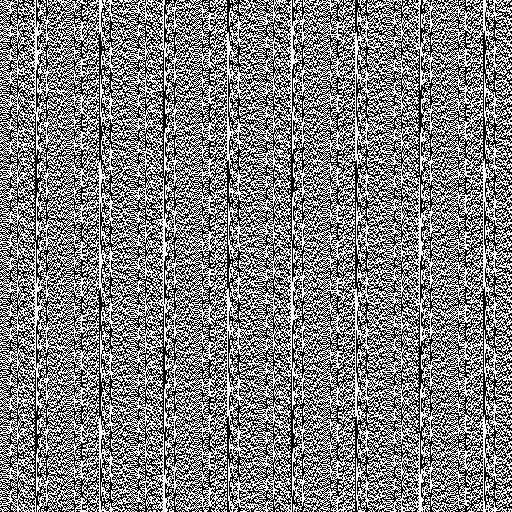
伪随机数
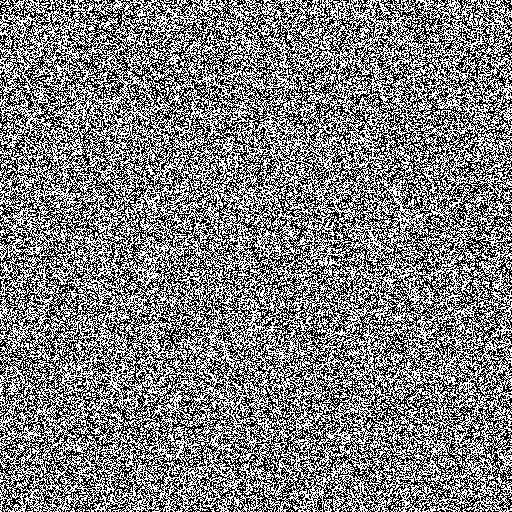
真随机数
发表回复